
Connectedmedics issues a Verified clinician profile only after completing Primary-Source Verification (PSV) aligned to NAMSS and NCQA standards. PSV means every credential is confirmed directly with the original issuing entity, not through self-reported data. The doctor license verification process covers the following items before a Verified badge appears on a profile:
- Government-issued photo ID (identity confirmation)
- State medical license(s) for all states where the clinician will practice
- DEA registration and NPI number
- Board certification (where applicable)
- Medical education and residency completion
- Malpractice history and loss runs
- Sanctions and exclusions (NPDB, OIG, SAM)
- Employment history (past employers contacted directly)
Recruiters see a Verified badge, a last-verified timestamp, and a link to the itemized audit trail on every confirmed profile. Automated checks complete in hours to days. Manual PSV, required when a primary source lacks a digital registry, can extend to 90–120 days.
Key Takeaways
Connectedmedics issues a Verified badge only after PSV-aligned confirmation of identity, licensure, and sanctions from primary sources, with a full audit trail available to recruiters on every profile.
| Point | Details |
|---|---|
| Verified = PSV + audit trail | Every badge reflects primary-source confirmation with a timestamped, sourced audit trail recruiters can export. |
| Gate interviews on Verified status | Set role-level verification requirements in the employer dashboard to filter unverified candidates automatically. |
| Supply complete documents upfront | Give clinicians the 10-item checklist before upload to keep cases on the automated path and avoid manual delays. |
| Manual PSV can take 90–120 days | Automated checks resolve in hours to days; the longer window applies only when primary sources require non-digital contact. |
| Continuous monitoring post-hire | The platform re-queries primary sources on a rolling schedule and removes badges within 24 hours of any adverse change. |
Table of Contents
- How the doctor license verification process works, step by step
- Every credential Connectedmedics verifies: a recruiter checklist
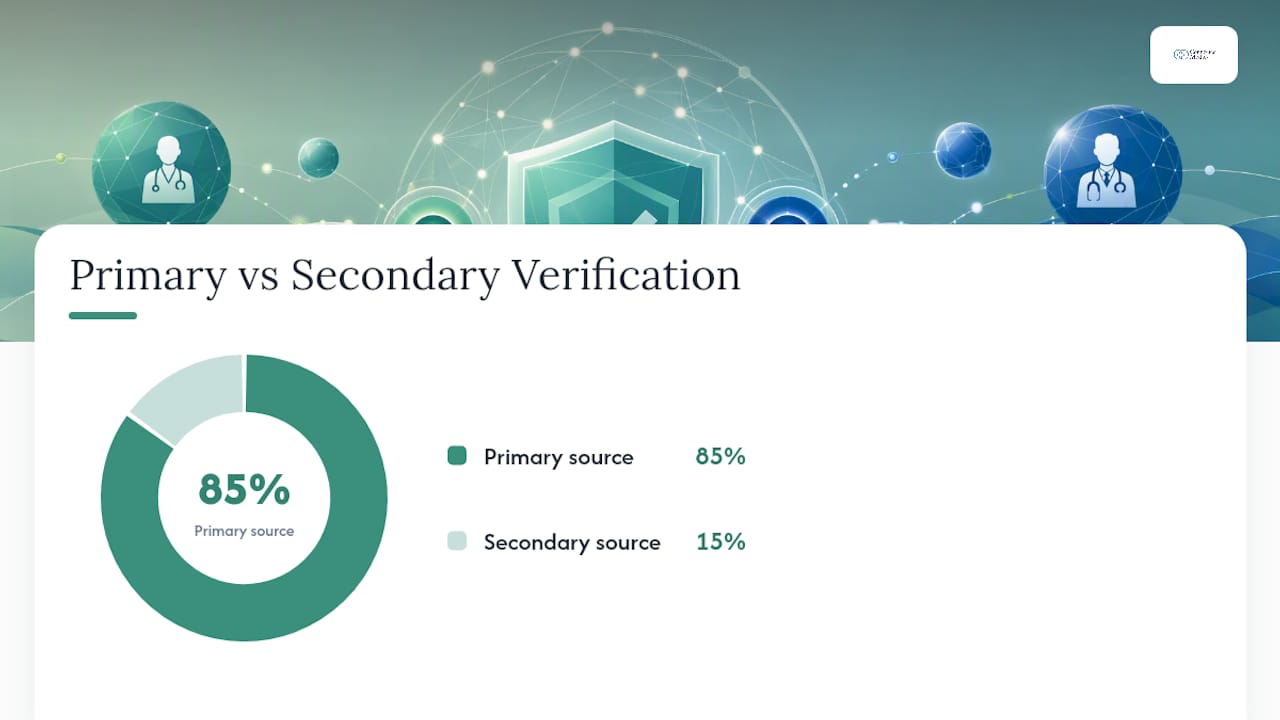
- Primary sources Connectedmedics consults and when secondary sources are allowed
- How Connectedmedics handles failed, incomplete, or adverse verifications
- How recruiters integrate Connectedmedics verification into hiring workflows
- Privacy, data handling, and compliance controls on the platform
- What clinicians should prepare to speed up verification
- Why platform-grade PSV changes what recruiters can actually rely on
- Connectedmedics verification tools for hiring teams
- Sources
How the doctor license verification process works, step by step
Connectedmedics runs a four-stage workflow from clinician application to badge issuance.
- Document collection. The clinician uploads required documents through the platform portal: government ID, license certificates, DEA certificate, board certificates, education diplomas, residency letters, and malpractice insurer contact details. The system time-stamps each upload and assigns a case ID.
- Automated registry checks. The platform queries integrated APIs and registries in real time or on a batched schedule. State licensing board databases, the NPI registry, DEA verification endpoints, OIG exclusion lists, SAM, and the NPDB are all queried programmatically. Matches are scored; high-confidence matches pass automatically.
- Human-analyst review. Low-confidence matches, document discrepancies, or sources without digital registries go to a credentialing analyst. The analyst contacts the issuing body directly by phone, fax, or written correspondence when needed. Manual PSV through these channels typically takes 90–120 days and is the primary source of timeline variation.
- Decision and badge issuance. Once all required items clear, the system issues the Verified badge. The audit trail records the source name, verification method, timestamp, and analyst ID for every item.
Timeline note: Automated checks on digitally integrated sources resolve in hours to a few days. The 90–120 day window applies only when a primary source requires non-digital contact.
Pro Tip: Ask clinicians to confirm that their state license number, DEA number, and board certificate number are current before they begin the upload. A single expired or mismatched number routes the case to manual review and adds days to the timeline.
Every credential Connectedmedics verifies: a recruiter checklist
NAMSS guidance lists 13 essential criteria that should be confirmed from primary sources within 180 days of a credentialing decision. Connectedmedics aligns its scope to that standard.
Always primary-source verified:
- Government photo ID
- State medical license(s), all active states
- DEA registration
- Board certification (where applicable)
- Medical school diploma and residency completion
- NPI registration
- NPDB, OIG, and SAM exclusion checks
Verified with documented secondary sources when primary is unavailable:
- Employment history at defunct or unresponsive employers (verified via documented secondary contact or sworn attestation)
- International credentials (verified through recognized equivalency bodies when the original institution cannot respond)
| Credential | Primary Source | Verification Method |
|---|---|---|
| State medical license | State licensing board | API / registry lookup |
| DEA registration | DEA Diversion Control Division | API query |
| NPI number | NPPES registry | Real-time API |
| Board certification | Specialty board (e.g., ABMS) | Registry lookup |
| NPDB sanctions | National Practitioner Data Bank | Direct query |
| OIG exclusions | OIG LEIE database | API / batch query |
| SAM exclusions | SAM.gov | API query |
| Medical education | Medical school registrar | Direct correspondence |
| Residency completion | Training program director | Direct correspondence |
| Malpractice history | Malpractice insurer | Direct correspondence |
| Employment history | Past employer HR | Direct correspondence |
Primary sources Connectedmedics consults and when secondary sources are allowed
The platform contacts the following primary sources directly for physician license verification and related credential checks:
- State medical licensing boards (all 50 states plus DC and U.S. territories)
- NPPES for NPI registration
- DEA Diversion Control Division for controlled-substance registration
- National Practitioner Data Bank (NPDB) for malpractice reports and adverse actions
- OIG List of Excluded Individuals/Entities (LEIE) for federal exclusions
- SAM.gov for federal contractor exclusions
- ABMS and specialty boards for board certification
- Medical school registrars for education verification
- Residency program directors for training completion
- Past employers for employment history
Secondary sources are used only under documented conditions: when the primary source no longer exists, is unresponsive after multiple contact attempts, or has formally designated an equivalency body. Every secondary-source use is logged in the audit trail with the reason for deviation.
Platform-visible verification badges and partner APIs provide strong trust signals in professional networks. LinkedIn's verification expansion demonstrates that badge-based credentialing, backed by partner API integrations, increases recruiter confidence and enables cross-platform verification signals. Connectedmedics applies the same principle: every badge links to a sourced, timestamped audit trail that recruiters can inspect.
How Connectedmedics handles failed, incomplete, or adverse verifications
Four outcomes are possible after the verification workflow runs:
- Verified. All required items confirmed from primary sources. Badge issued.
- Pending. Awaiting a response from a primary source. Profile shows "Verification in Progress." No badge displayed.
- Remediation requested. The clinician must supply additional documents or correct a discrepancy. The platform sends a task notification with specific instructions.
- Blocked/Flagged. An adverse finding (active exclusion, revoked license, unresolved malpractice report) prevents badge issuance. The profile is held from recruiter view.
Responsibility by outcome:
- Pending: Connectedmedics analyst monitors and follows up with the primary source.
- Remediation: The clinician owns the response. The recruiter receives a status notification but cannot act until the clinician resolves the item.
- Blocked/Flagged: A senior analyst reviews the finding, documents it in the audit trail, and notifies the hiring employer per platform policy.
Pro Tip: When a case sits in Remediation for more than five business days, contact the clinician directly and ask them to log into the platform and check their task queue. Most delays at this stage are caused by clinicians who have not seen the notification.
How recruiters integrate Connectedmedics verification into hiring workflows
Recruiters interact with verification data through three channels.
Recruiter-facing signals on every profile:
- Verified badge (present or absent)
- Last-verified timestamp
- Itemized audit trail link showing source, method, and timestamp per credential
- Status indicator (Verified / Pending / Remediation / Flagged)
Available integrations:
- Employer dashboard with filterable candidate lists by verification status
- CSV and structured data exports for upload into ATS or HR systems
- API endpoints returning verification status per clinician ID
- Webhook alerts triggered by status changes (badge issued, badge lapsed, adverse flag)
Digital identity best practices recommend automated alerts for expirations and re-credentialing events, centralized audit trails, and encrypted data handling. Connectedmedics' webhook and dashboard design follows those recommendations directly.
Recruiters can set minimum verification requirements at the job-posting level. A role requiring an active Verified badge will not surface unverified candidates in search results. A practical workflow: post the role with a Verified gate, review only badged candidates, proceed to interview, then activate continuous monitoring for the hired clinician's license status throughout employment.
Pro Tip: Use the employer dashboard to set role-specific verification gates before posting. This filters unverified candidates out of the queue automatically and reduces manual screening time.
Privacy, data handling, and compliance controls on the platform
Connectedmedics applies the following controls to clinician documents and verification data:
- Encryption at rest and in transit for all uploaded identity documents and credential files
- Role-based access controls limiting document visibility to credentialing analysts and authorized employer accounts
- Data minimization: only the data required to complete and document PSV is retained
- Retention windows: sensitive identity documents (e.g., passport scans) are deleted after verification is complete; the audit trail record (source, timestamp, outcome) is retained to meet accreditor and payer documentation requirements
- Multi-factor authentication for all platform accounts
Centralized credentialing platforms that automate verification, maintain audit trails, apply MFA, and encrypt data reduce both credentialing errors and privacy risk. Audit trails that capture source, timestamp, and verifier identity meet accreditor and payer documentation expectations without requiring facilities to maintain separate paper files.
Continuous monitoring re-queries primary sources on a rolling schedule. If a license lapses or a new exclusion appears, the platform removes the Verified badge within 24 hours and sends a webhook alert to linked employer accounts. This supports re-credentialing cycles without manual calendar tracking.
Clinicians may request redaction of specific identity document fields after verification is complete. The platform retains only the minimum record needed to preserve audit integrity.
Note: Connectedmedics' verification supports but does not replace facility-level credentialing decisions. Hiring organizations should confirm that platform PSV meets their internal credentialing policy and any applicable accreditor requirements.
Pro Tip: Download the audit trail export for each hired clinician and store it in your facility's credentialing file. This satisfies most accreditor requests for PSV documentation without duplicating the verification work.
What clinicians should prepare to speed up verification
Give clinicians this checklist before they begin the upload process. Complete submissions hit the automated path. Incomplete ones go to manual review.
- Current government photo ID (passport or driver's license, not expired)
- State medical license document(s) for every state where they will practice, plus the license number for each
- DEA certificate with registration number
- Board certification document(s) with certificate number
- NPI number (from the NPPES registry)
- Medical school diploma or official transcript
- Residency completion letter from the training program director
- Malpractice insurer name and contact for loss-run verification
- Past employer HR contact details for employment history verification
- International credential equivalency documentation if applicable (e.g., ECFMG certificate for international medical graduates)
Document format guidance:
- Scan at 300 DPI minimum; all text and seals must be legible
- File names should follow the format: LastName_CredentialType_State (e.g., Smith_StateLicense_CA)
- Multiple-state licenses: upload each as a separate file with the state code in the file name
- International credentials: include an English translation from a certified translator alongside the original
Clinicians can track verification status in their platform dashboard and respond to analyst task requests directly through the messaging interface. Response time to analyst requests is the single largest clinician-controlled variable in the timeline.
Pro Tip: Before uploading, check that every license and certificate shows an expiration date that is at least 30 days in the future. Documents expiring within 30 days trigger a renewal flag and pause verification until the renewed document is uploaded.
For a full walkthrough of the application and screening process, see how to apply for healthcare vacancies efficiently.
Why platform-grade PSV changes what recruiters can actually rely on
The credentialing industry has operated on paper-based PSV for decades. The NAMSS standard exists precisely because self-reported credentials are unreliable. What changes when a platform automates PSV to that standard is not just speed. It is the nature of the signal itself.
A Verified badge on Connectedmedics is not a self-attestation. It is a documented, sourced, timestamped confirmation from the issuing authority. That distinction matters for patient safety, for liability, and for the recruiter's own defensibility when a hiring decision is later reviewed. Recruiters who gate interviews on a Verified badge are not adding a bureaucratic step. They are replacing a manual verification task their team would otherwise perform, often less rigorously, with a documented PSV record they can export and file.
The 90–120 day manual PSV window is real, but it applies to a minority of cases. Most physician license verification on the platform resolves in days through automated registry queries. The practical recruiter posture is to require Verified status before extending an offer, not before beginning the process. Start the verification early, gate the offer, and use continuous monitoring to catch any post-hire changes.
Connectedmedics verification tools for hiring teams
Connectedmedics gives hiring teams direct access to PSV-backed clinician profiles, an employer dashboard with verification filters, and API/webhook integrations that push status changes into existing ATS systems. Recruiters can set minimum verification gates at the job-posting level, so only Verified candidates surface in search results.
Key features for employer accounts: Verified profile badges with audit trail exports, continuous monitoring alerts for license lapses or new exclusions, re-credentialing schedule tracking, and CSV exports for credentialing file documentation. For teams managing high-volume hiring across multiple specialties, the employer tools page shows how to configure verification requirements by role and activate webhook alerts. Request access or review employer plan options directly on the platform.
Sources
- NAMSS PSV and credentialing best practices (PDF)
- LinkedIn verification expansion and partner API — TechCrunch
- Digital identity and credentialing best practices — Censinet
Facility credentialing policies and accreditor requirements vary. Confirm that platform PSV documentation meets your organization's specific credentialing standards before relying on it as the sole verification record.